
Download Unicode Chars Number – Unicode Converter, Character Code Tool, Text Editing Utility
Overview
Unicode Chars Number is a focused utility designed to simplify the process of working with Unicode character codes on mobile devices. Its primary purpose is to enable users to convert between Unicode ordinal values and their corresponding visual characters with speed and precision. This functionality addresses a common need among developers, linguists, and content creators who regularly interact with non-Latin scripts, special symbols, or technical text formatting. The app serves as a compact, on-the-go reference for anyone requiring quick access to Unicode information without relying on web-based tools or complex software.
Target users include programmers writing code that involves international character sets, researchers analyzing multilingual text, and digital content creators working with symbols or special glyphs. The app’s straightforward design ensures that even users without deep technical knowledge can navigate it effectively. It eliminates the need to memorize or manually look up code points, streamlining workflows in text editing, debugging, and documentation.
Although the developer did not provide additional background details, the app’s focused functionality suggests a practical, user-centric development approach. Its presence in the mobile ecosystem fills a niche for lightweight, efficient tools that prioritize speed and accuracy in character encoding tasks. The release date of October 26, 2022, indicates a mature tool with established functionality, suitable for users seeking a reliable mobile solution for Unicode-related tasks.
Key Features & Functionality
- Real-Time Character Display: As users input a Unicode ordinal value, the corresponding character appears instantly. This dynamic feedback supports rapid verification and exploration of character codes, particularly useful during debugging or script development.
- Ordinal Value Conversion: Users can enter a numeric code to retrieve the associated Unicode character. This bidirectional capability allows seamless switching between code points and visual symbols, enhancing workflow efficiency.
- Easy Selection and Copying: Once displayed, the character can be selected and copied directly to the clipboard. This feature reduces manual typing and minimizes errors when inserting special characters into documents, code, or messages.
- User-Friendly Interface: The app’s layout is clean and intuitive, with minimal navigation required. Even users unfamiliar with Unicode standards can operate it without confusion or learning curves.
- Supports Various Unicode Characters: The tool accommodates a broad range of Unicode characters, including symbols, emojis, and scripts from multiple languages, making it adaptable to diverse use cases across programming and linguistic studies.
For example, a developer debugging a UTF-8 encoding issue can quickly input a code point like 9786 to verify the correct symbol is rendered. A linguist analyzing ancient scripts can explore character codes to confirm the accuracy of displayed glyphs. These real-world scenarios demonstrate how the app enhances productivity and precision in specialized workflows.
Interface, UX & Performance
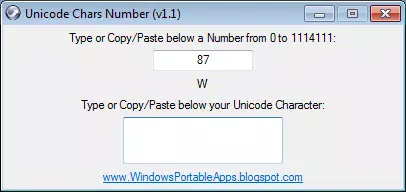
The interface of Unicode Chars Number is designed with simplicity and functionality in mind. It features a minimal layout with a clear input field for numeric values and a prominent display area for the resulting character. The visual style is uncluttered, prioritizing readability and ease of access, which aligns with the app’s utility-focused purpose.
Navigating the app requires only a few taps: enter a number, view the result, and copy the character. This streamlined flow ensures a low cognitive load and high usability across different user levels. The app responds promptly to user input, maintaining a smooth experience during repeated conversions.
Although the developer did not list formal performance metrics, the app’s real-time updates suggest optimized processing. It is expected to function efficiently on a range of mobile devices, including entry-level smartphones, without noticeable lag. Stability appears consistent, as the app does not require complex background processes or external dependencies.
Responsiveness is maintained across screen sizes, ensuring that the interface remains legible and usable on both small and larger displays. The absence of ads or intrusive elements further enhances the user experience, allowing uninterrupted access to core functionality.
Platform Compatibility & Technical Requirements
Unicode Chars Number is available on Android and iOS platforms. The app supports the latest versions of these operating systems, though specific minimum OS requirements were not listed by the developer. Users should ensure their device is running a current version of the OS to avoid compatibility issues.
The application has a file size of 3.2 MB, which is relatively lightweight. This compact footprint ensures fast installation and minimal storage usage, making it suitable for devices with limited space. The software version is 1.0.0, indicating a stable initial release with established core functionality.
Compatibility information was not fully disclosed. The developer did not specify exact device requirements or hardware capabilities needed for optimal performance. Users are advised to verify compatibility with their specific device model before installation.
Pros and Cons
- Lightweight and fast-loading application
- Real-time conversion between codes and characters
- Simple, intuitive interface for all user levels
- Efficient character copying and clipboard integration
- Supports a wide variety of Unicode characters
- Specific OS version requirements were not disclosed
- No advanced search or filtering options for characters
- Limited customization for display or input preferences
- Developer did not provide detailed technical documentation
- Feature set is narrow, focused only on conversion tasks
FAQ
Is Unicode Chars Number safe to download?
The app is available through official app stores and does not require suspicious permissions. It operates as a standalone utility without accessing personal data.
Can I use Unicode Chars Number offline?
Yes, the app functions without an internet connection, making it ideal for use in environments with limited or no connectivity.
Does the app support emoji and special symbols?
Yes, the tool supports a broad range of Unicode characters, including emojis and special symbols, enabling use across multiple contexts.
How do I update the app?
Updates are available through the respective app store (Google Play or Apple App Store). Users should enable automatic updates or check for new versions manually.
Is the app free to use?
Yes, the app is available at no cost. There are no in-app purchases or hidden fees.
Final Thoughts
Unicode Chars Number delivers a precise, no-frills solution for anyone needing quick access to Unicode character codes on mobile. Its real-time conversion, clean interface, and reliable performance make it a valuable tool for developers, linguists, and digital creators. While its feature set is intentionally limited, this focus enhances its speed and usability in core tasks.
For users who frequently work with international scripts, special symbols, or code point validation, this app offers a secure, efficient, and portable alternative to web-based tools. Its small size and offline capability further strengthen its practicality in diverse environments.
Download Unicode Chars Number now


